Build Your First Revenue Play
Turn a set of criteria into a live audience that publishes into Salesforce and drives your Flows.
A Revenue Play is a saved list of criteria. SignalRx evaluates every record against it continuously, and publishes the resulting membership into Salesforce as a field value. Records join when they qualify and leave when they stop. Nobody pulls a spreadsheet, and the audience never goes stale.
That last part is the whole point. Because membership is an ordinary Salesforce field, everything downstream can key on it without any new integration: Flows, list views, reports, sequences, your marketing platform.
Leads plays and Customers plays
Plays live on one of two pages, and the page decides what the play is for.
- Leads. Acquisition. Who to go after, and why now. The page opens with the Lead Quality Overview chart, which plots Fit score over time split into High, Moderate, Low, and No Fit, so you can see whether the pipeline you are generating is getting better or just bigger.
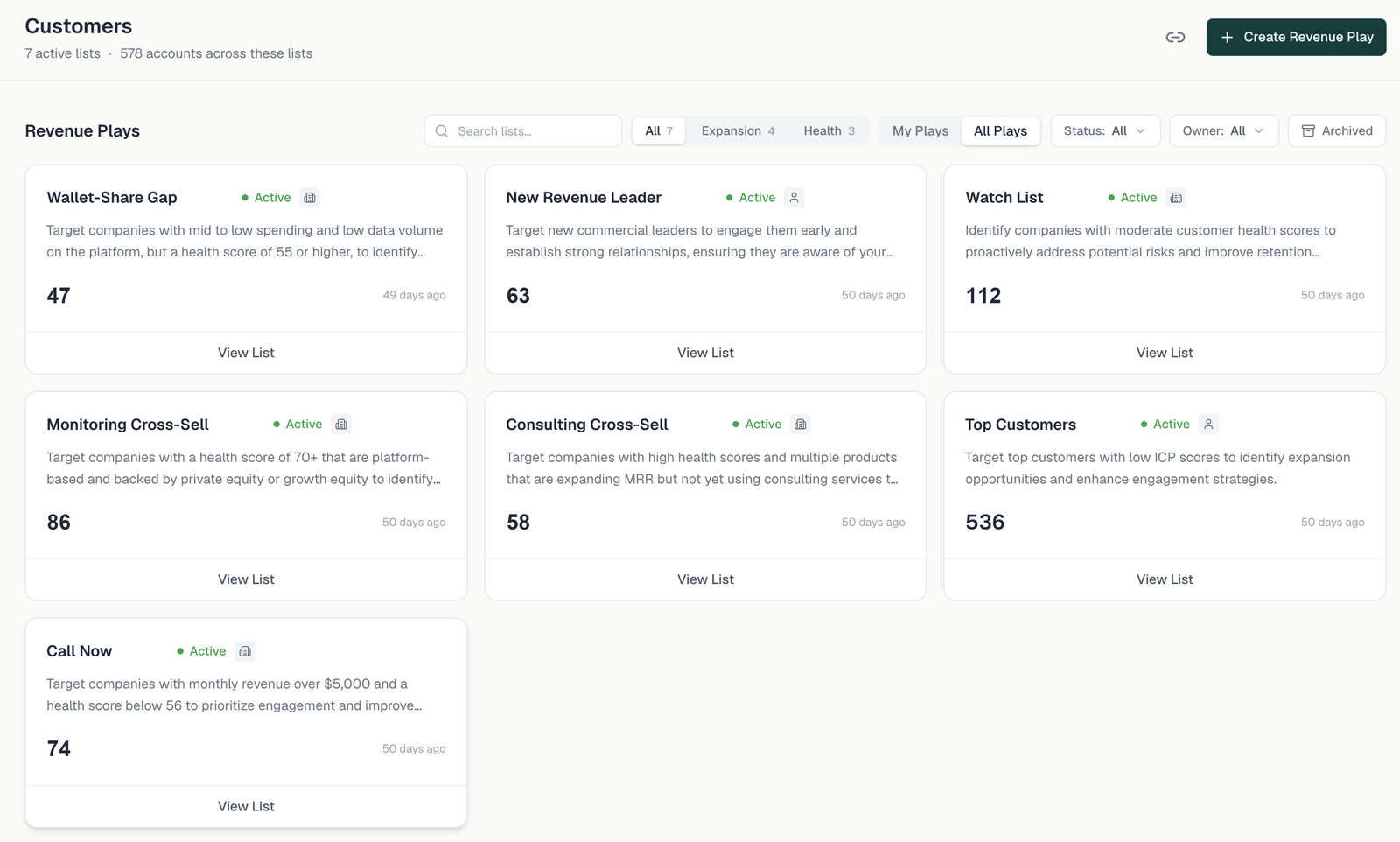
- Customers. Retention and expansion, grouped into Expansion and Health categories. These plays lean on the Health score and on revenue and product signals.

01 · Category and name
Step one asks for a category and a list name. On the Leads page the category is Leads/Contacts, and the play works from the Leads and Contacts in Salesforce. On the Customers page the category is Expansion or Health, which decides the tab the play appears under. The name is what lands in Salesforce, so treat it as a field value rather than a title: short, specific, stable, and recognisable in a report. The wizard's own hint is the right test: a clear, customer-facing name that states what the list is.

02 · Build the criteria
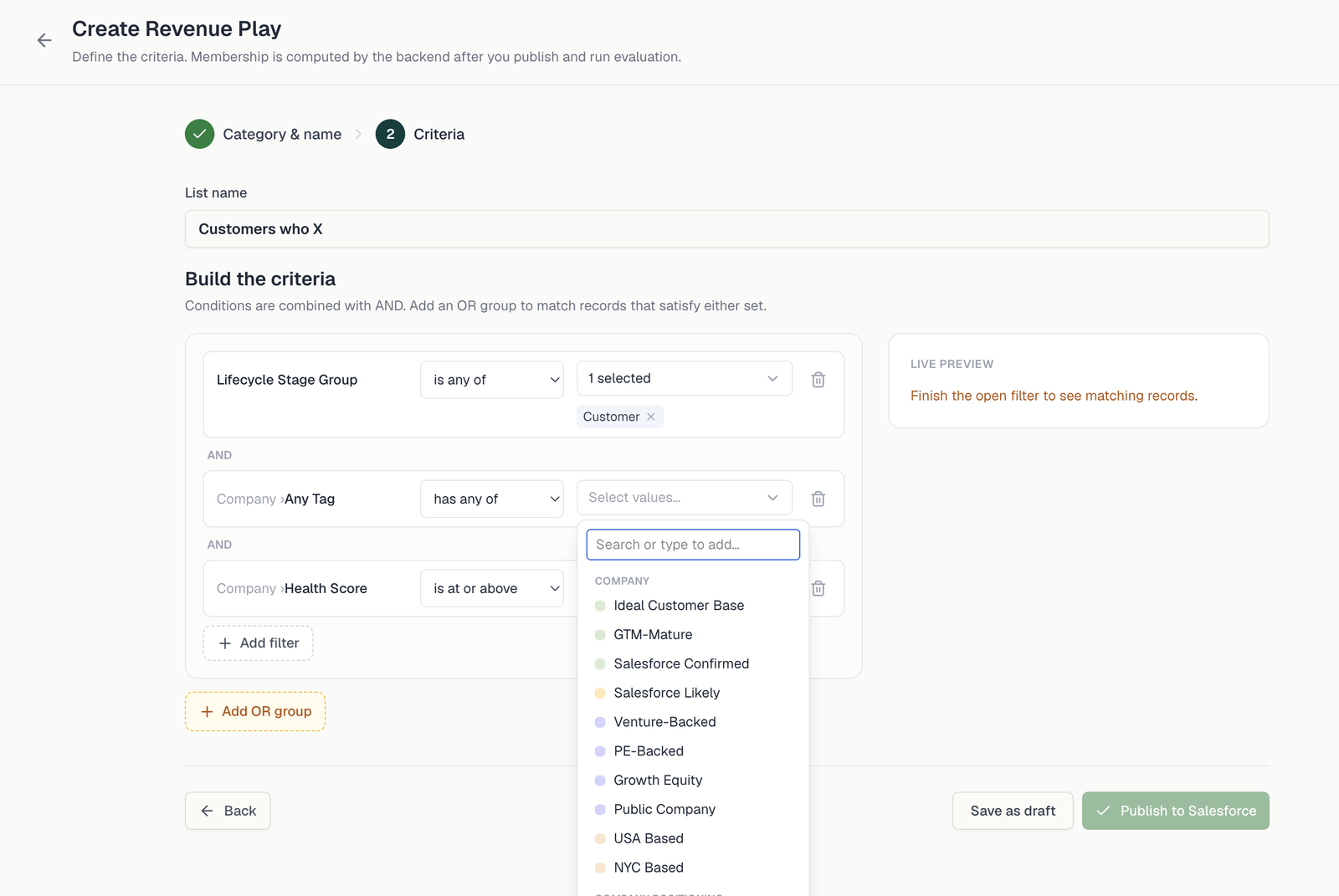
Step two is the criteria builder. Conditions are combined with AND. Add an OR group to match records that satisfy either set. That is the whole grammar: a stack of AND filters, and optional OR groups beside them.
Filters
Each filter is three parts: a field, an operator, and one or more values. A typical customer-side play stacks three of them.
- Lifecycle Stage Group is any of Customer. Start almost every play here. It is the cheapest way to keep prospects out of a customer play, and customers out of an acquisition play.
- Company › Any Tag has any of one or more Tags. This is where most of the intent lives.
- Company › Health Score is at or above a number. Thresholds, not tiers, when you want to draw the line yourself.
Tag groups
Tags are organized into groups, and the group tells you what kind of statement the Tag is making. Opening the value picker shows them in order.
| Tag group | What it describes | Examples from the picker |
|---|---|---|
| Company | Durable facts about the account. | Ideal Customer Base, GTM-Mature, Venture-Backed, PE-Backed, Growth Equity, Public Company, USA Based |
| Company Positioning | How the company presents itself in its market. | Configured to your business |
| External Signal | Something that happened in the outside world. | New Product Launch, GTM Hiring, Recent Funding, Recent M&A, Leadership Change |
| Product | What the account owns or uses today. | Platform, Contact Monitoring, Signal Monitoring, Consulting, Full Suite |
| Product Signal | How usage is moving. | Usage Growing, Usage Decline, Consistent Usage, Going Dark, High Data Volume, Low Data Volume |
| Revenue | Spend, trajectory, and tenure. | Top Spender, Expanding MRR, Contracting MRR, Recently Onboarded, Long-Tenured, Contract Renewing 90d |
These Tags come from SignalRx's multi-source research (news, web, LinkedIn and other social), not one feed.

The useful plays combine groups rather than stacking Tags from one. A Product Tag plus a Product Signal Tag plus a Revenue Tag describes a situation, not just a segment: owns one module, usage growing, expanding spend. That is a cross-sell conversation. Swap the signal for Going Dark and the same three groups describe a retention problem.

OR groups
Use Add OR group when two different situations should feed one motion. A renewal-risk play might match accounts whose Health score is below a threshold or that carry Contracting MRR: different evidence, same response. Within a group, conditions still AND together.
Live preview
The live preview panel sits beside the builder and updates as you go. Until every filter has a value it says so (finish the open filter to see matching records), and then it shows what the play currently matches. Use it as a feedback loop: add the narrowest filter first, watch the count, and stop tightening when the number stops making sense. A play that matches zero records and a play that matches your whole database are both configuration errors, and you find both here rather than in Salesforce.
03 · Save as draft, or publish
Two buttons, and the difference matters.
- Save as draft. Nothing is written to Salesforce. The play exists, you can keep editing it, and you can review the would-be membership with the people who will work the list. Do this first, every time.
- Publish to Salesforce. Membership is computed after you publish and run evaluation, then written into the GW list membership fields on the next sync cycle.
Review the first run by hand. First runs always surface something: a partner account that should be excluded, an integration contact with no real inbox, a Tag that means something slightly different from what you assumed. Fix it in the draft, not downstream.
How membership shows up in Salesforce
Published plays write their name into GW Contact List Memberships on Contact and Lead, or GW Company List Memberships on Account and Lead, depending on the object the play is built on. Both fields are multi-select, so a record can be in several plays at once, and values drop off automatically when a record stops qualifying.
That makes the field an automation trigger. Build a record-triggered Flow that runs when a record is updated to meet the condition, with the membership field contains your play name, and then do the obvious thing: add to a Campaign, enroll in a sequence, create a Task, reassign the owner. Use contains, never equals, because the field holds several values.
The capability guides walk through complete builds on exactly this pattern: an always-on nurture in Win Back Lost Deals with an Always-On Nurture, an outbound motion in Cross-Sell at Day 30 with an Outbound Sequence, health-driven alerting in Catch At-Risk Customers the Day They Turn, and a usage-triggered expansion play in Upsell Customers Outgrowing Their Plan.
Want any of these running on your data?
Frequently Asked Questions
.svg)


.avif)